
When you're using a generative AI, or what people call AI today, they usually have a disclaimer text prompting you to double-check the result or be careful of the answer. Why is that? Because most AIs are designed to be your helpful assistant. And when they can't be that helpful, they will still try to be helpful. And that's when the hallucinating starts.
Hallucinations?
So how does an AI hallucinate exactly? It's supposed to be logical since it's built on tangible data, right? Technically yes, but really, no. Modern LLMs are optimized to be helpful, not to be silent: they’re designed with an urge to answer.
When they don’t know the answer, they’ll still try to produce a plausible one anyway. That’s what we call a hallucination. It’s nothing more than an educated guess, which is often presented with a high-confidence level (this is all about probabilities, but that's another topic).
So to prevent them from being wrongly helpful, there's RAG: a technique to reduce hallucination.
RAG
What's RAG? RAG stands for Retrieval-Augmented Generation. In plain English: giving AI documents to read before it answers, instead of letting it guess from memory.
Think of it like an exam. Without RAG, AI is taking a closed-book test, relying purely on what it memorized during training. With RAG, it's an open-book exam. The AI gets to look up the answer in actual documents before responding.
Here's why this matters: every AI has a knowledge cutoff. Ask Gemini about events after January 2025, and you'll get "I don't have information about that." Ask Claude about your company's internal policies, and it has no clue because that data was never in its training set.
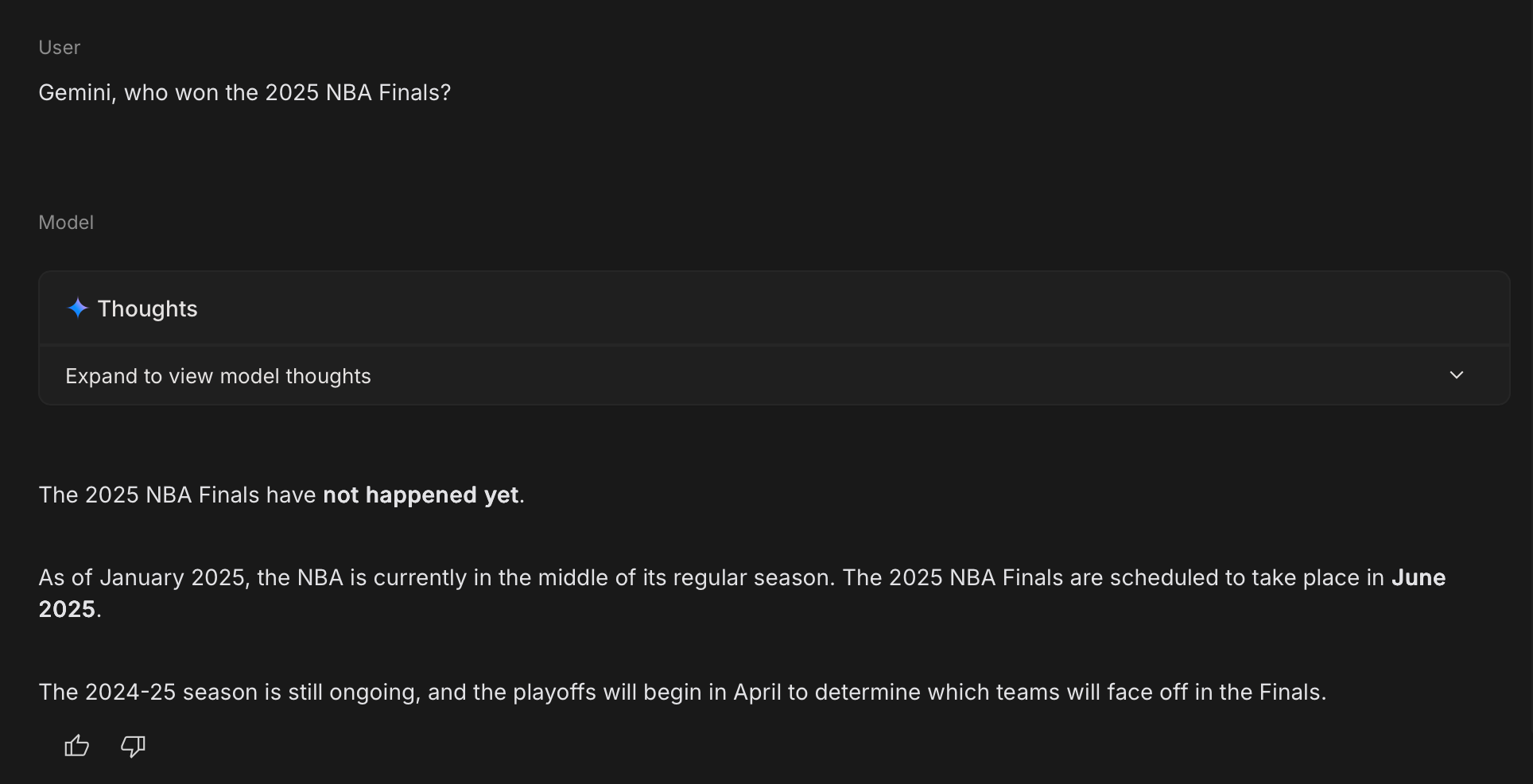
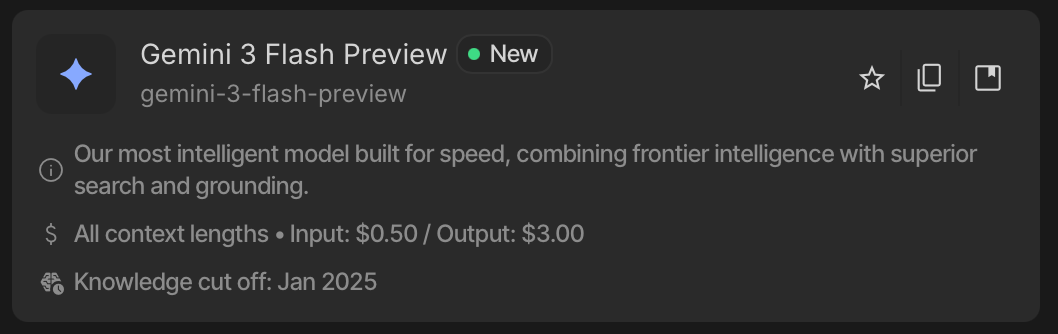
Now, look at this. Same Gemini. Same knowledge cutoff. But when we let it search Google first (which is basically RAG with the web as the knowledge base), it gets the right answer. That's the power of grounding.
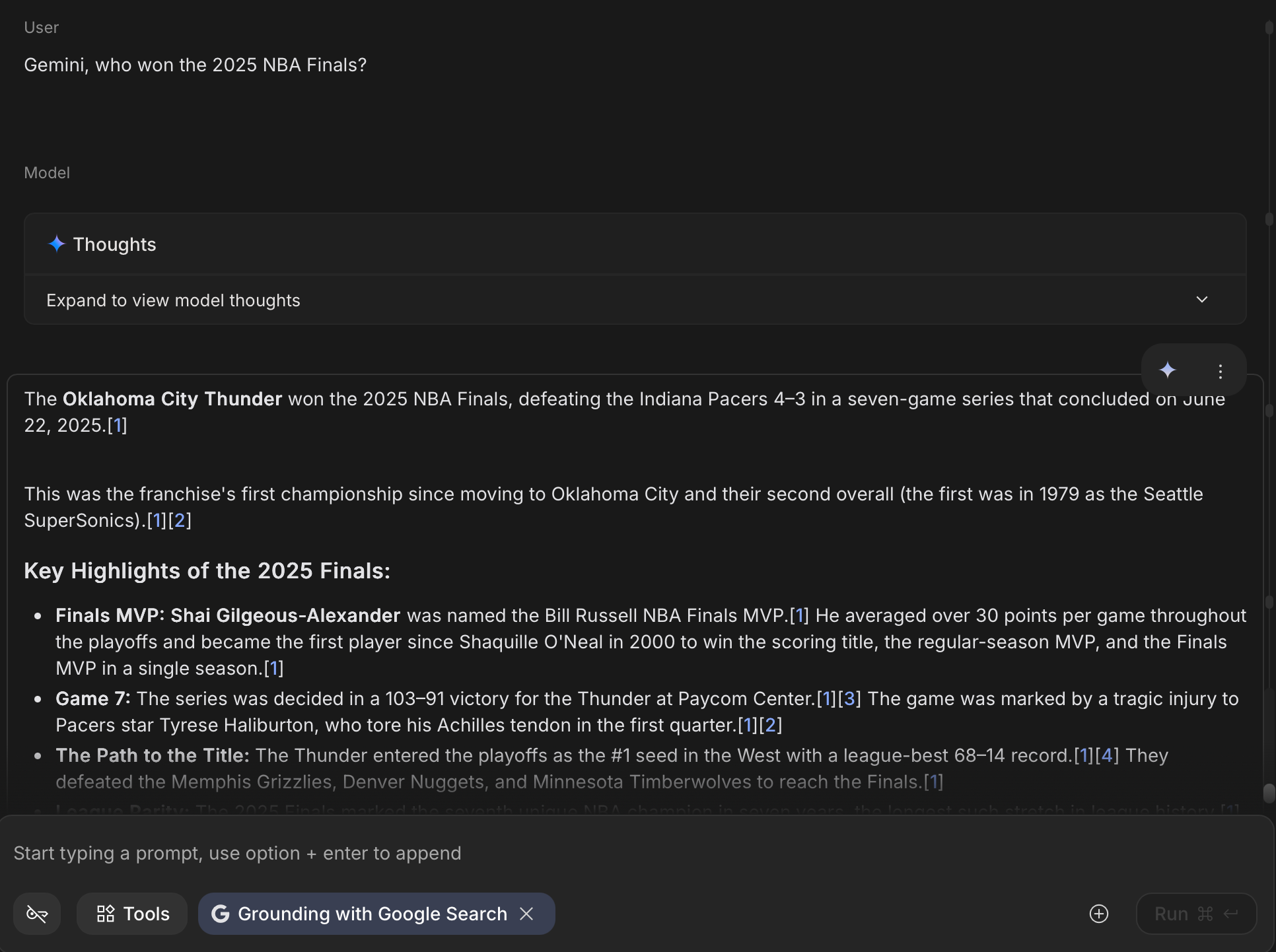
RAG solves this by flipping the script. Instead of asking AI to remember everything, we give it the ability to look things up.
How RAG Actually Works
RAG isn't magic. It's a pipeline with four main stages, and understanding each one helps you see why it works.
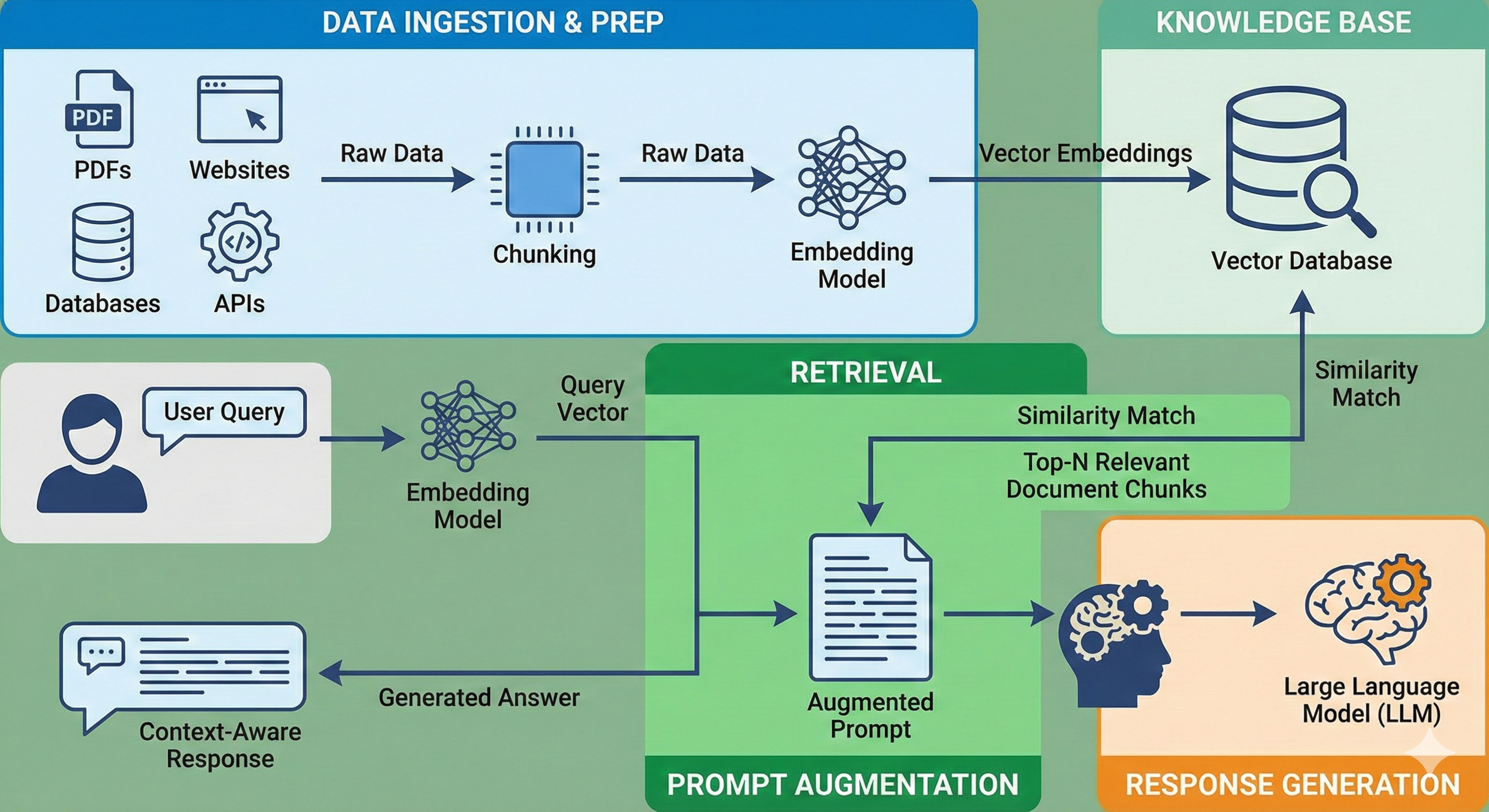
Stage 1: Data Ingestion & Prep
Before anything happens, you need to prepare your knowledge base. This is where your PDFs, websites, databases, or API data come in.
But you can't just dump a 200-page PDF into an AI and call it a day. The AI needs that information in a format it can search through efficiently. This is where chunking and embedding come in.
Chunking means breaking down your documents into smaller pieces, usually around 300-500 words each. Why? Because if you feed the AI a massive wall of text, it gets overwhelmed. Smaller chunks are easier to match with user questions.
Embedding is where it gets interesting. Each chunk gets converted into a vector, which is basically a list of numbers that represents the meaning of that text. This isn't keyword matching. It's semantic understanding. A chunk about "resetting your password" and another about "forgot login credentials" will have similar vectors even though they use different words.
These vectors get stored in a Vector Database, a specialized storage system designed to find similar meanings fast. Think of a vector as a GPS coordinate for an idea. Words with similar meanings end up parked in the same neighborhood in the vector database.
Stage 2: Retrieval
Now a user asks a question: "How do I reset my password?"
The system doesn't search for exact keywords. Instead, it:
- Converts the question into a vector (same embedding process)
- Searches the Vector Database for chunks with similar vectors
- Pulls out the top 3-5 most relevant chunks
This is semantic search. The AI finds content that means the same thing, not just content that uses the same words. So even if your documentation says "credential recovery" instead of "reset password," the system will still find it.
Stage 3: Prompt Augmentation
This is where RAG gets its name. The system takes those retrieved chunks and augments the prompt by injecting them into the conversation.
Instead of asking the AI:
"How do I reset my password?"
The actual prompt sent to the AI looks more like:
You are a helpful assistant.

Here are relevant documents:
---
[Chunk from user manual, page 12]
"To reset your password, navigate to Settings > Security >
Change Password. You will need to verify your identity via email."

[Chunk from FAQ]
"If you forgot your password, click 'Forgot Password' on the
login screen. A reset link will be sent to your registered email."
---

User question: "How do I reset my password?"

Answer ONLY based on the documents above. If the answer isn't
in the documents, say you don't have that information.
This is called grounding. You're literally grounding the AI's response in actual source material. No more guessing. No more hallucinations based on vague training data.
Stage 4: Response Generation
Finally, the LLM reads the augmented prompt and generates an answer. But this time, it's not pulling from its training data. It's pulling from the documents you gave it.
The output might look like:
"To reset your password, go to Settings > Security > Change Password. If you've forgotten it, use the 'Forgot Password' option on the login screen, and a reset link will be sent to your email."
The AI synthesizes the information into natural language, but the facts come from your documents. Some systems even add citations, telling you exactly which document or page the answer came from.
Why RAG Works Better Than Alternatives
You might be thinking: "Can't I just copy-paste my documents into the prompt?" Technically, yes. But there are better and worse ways to give AI context.
| Approach | How It Works | Pros | Cons | Best For |
|---|---|---|---|---|
| Fine-tuning | Retrain the model on your data | Knowledge baked into model | Expensive, slow updates | Domain-specific language (legal, medical) |
| Prompt Stuffing | Paste documents directly into prompt | Simple, no setup | Limited by context window | 1-2 short documents |
| RAG | Dynamic retrieval + generation | Scales to millions of docs, easy updates | Requires Vector DB setup | Most real-world use cases |
The key difference? Fine-tuning is like sending the AI to medical school, it learns how to speak and think like a doctor. RAG is like giving that doctor a specific patient's medical file, it provides the facts to apply those skills to.
And unlike fine-tuning, when your documentation updates, you don't need to retrain anything. Just update the Vector Database, and the AI immediately has access to the new information.
Real-World Use Cases
RAG isn't theoretical. It's already powering AI systems you probably use.
Customer Support: Companies like Intercom and Zendesk use RAG to build chatbots that answer questions by reading product manuals, FAQs, and troubleshooting guides. Instead of training a model on every possible question, they just point it at their documentation.
Enterprise Knowledge: Tools like Notion AI and Slack's AI search use RAG to help employees find information buried in wikis, meeting notes, and internal policies. The AI doesn't memorize your company's handbook; it searches through it in real-time.
Education: Platforms like Khan Academy's Khanmigo use RAG to answer student questions by referencing lecture materials and textbooks. The AI becomes a study assistant that actually knows what's in the course content.
Legal & Compliance: Legal tech companies like Harvey.ai and Casetext use RAG to search through contracts, case law, and regulations. Lawyers can ask questions in plain English, and the system surfaces relevant legal precedents.
The pattern is clear: RAG works best when you have a lot of documents and need accurate, source-backed answers.
What You Actually Need to Build RAG
If you're thinking about implementing RAG, the stack isn't complicated. You need four core components:
1. Vector Database – Where your embedded chunks live (Pinecone, Weaviate, Chroma)
2. Embedding Model – Converts text into vectors (OpenAI's text-embedding-3, or open-source like sentence-transformers)
3. LLM for Generation – The brain that writes answers (GPT-4, Claude, Gemini, or open models like Llama)
4. Orchestration Layer – Handles the pipeline (LangChain, LlamaIndex, or build your own)
That's it. The exact choices depend on whether you want managed services or self-hosted, and whether you need to run everything on-premise. But the components stay the same.
Common Pitfalls (And How to Avoid Them)
RAG sounds simple, but the devil's in the details. Here are the mistakes people make:
Problem 1: Chunk Size Is Off
Too large, and the AI gets confused by irrelevant information. Too small, and it lacks context to answer properly. The sweet spot is usually 300-500 words per chunk, with a bit of overlap so sentences don't get cut off mid-thought.
Problem 2: Retrieval Quality Sucks
You ask about "password reset," but the system pulls up chunks about "account deletion." This happens when:
- The embedding model isn't good enough
- Your chunks aren't semantically distinct
Solution: Use hybrid search (combine keyword matching with semantic search) and add a reranking step where a second model filters the results before sending them to the LLM.
Problem 3: Hallucinations Still Happen
RAG reduces hallucinations, but it doesn't eliminate them. The AI might still connect dots that aren't there or misinterpret retrieved chunks.
Solution: Aggressive prompt engineering. Say things like "Answer ONLY if the information is in the documents. If not, say 'I don't have that information.'" Better yet, force the model to cite sources so users can verify the answer themselves.
When NOT to Use RAG
RAG isn't a silver bullet. There are cases where it's overkill or just the wrong tool.
Skip RAG if:
- You have fewer than 10 documents → Just paste them into the prompt (prompt stuffing is fine here)
- You need creative generation (writing fiction, ads) → RAG constrains creativity by forcing the AI to stick to source material
- You're dealing with real-time data (stock prices, live sports scores) → Direct API calls are faster and more accurate
RAG shines when you have lots of static or slow-changing documents that you need to reference accurately. If your use case doesn't fit that pattern, you might be better off with a simpler approach.
The Future: RAG Is Just the Start
RAG is the baseline today, but the technology is evolving fast.
Agentic RAG: Instead of you deciding which documents to search, the AI decides. It can query multiple knowledge bases, APIs, and even the web, then synthesize everything into one answer.
Multimodal RAG: Right now, most RAG systems work with text. But the next generation will handle images, videos, and audio. Imagine asking "Show me diagrams about X" and the AI retrieves relevant charts from your PDFs.
Graph RAG: Instead of treating documents as isolated chunks, Graph RAG uses knowledge graphs to understand relationships. It knows that "John works at Company X" and "Company X makes Product Y," so when you ask about Product Y, it can pull in context about John too.
The core idea stays the same: give AI documents to read before it answers. But how we do that is getting smarter.
Getting Started
If you want to try RAG yourself, here's the easiest path:
- Start with LangChain: They have pre-built templates and Jupyter notebooks you can run in minutes
- Use Chroma for storage: It's free, runs locally, and requires zero setup
- Test with 5-10 documents: Don't start with your entire company wiki. Start small, see what works, then scale
Resources:
- LangChain Q&A Tutorial: https://python.langchain.com/docs/use_cases/question_answering/
- Chroma Getting Started: https://docs.trychroma.com/getting-started
Conclusion
RAG isn't complicated. It's just "let the AI read before it answers." But making it work well requires attention to detail: good chunking, smart retrieval, and careful prompt engineering.
The payoff is worth it. Instead of an AI that guesses and hallucinates, you get one that references actual sources. Instead of a system that gets outdated the moment you deploy it, you get one that stays current as long as you update the documents.
For most real-world use cases where accuracy matters, RAG is the right answer. The question isn't "Should I use RAG?" It's "How do I implement it well?"